In today’s ever-evolving cybersecurity landscape, having a skilled team is crucial. But what if you could add an AI assistant to your security arsenal? Enter Microsoft Security Copilot, a new solution leveraging generative AI to empower security professionals.
What Does Security Copilot Do?
Security Copilot is a cloud-based solution that integrates with various Microsoft security products like Defender XDR, Intune, and Entra. It acts as an AI co-pilot, offering support throughout the security lifecycle. Here are some key areas where Security Copilot shines:
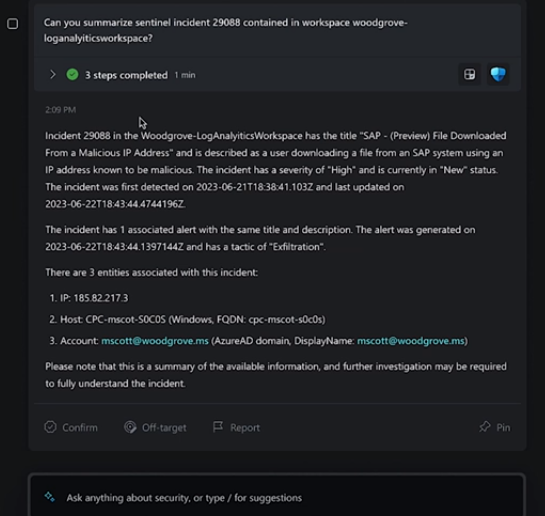
- Incident Response: Quickly analyze incident details, prioritize threats, and suggest remediation steps, saving valuable time during critical situations.
- Threat Hunting: Uncover hidden threats through AI-powered analysis of vast security data sets, helping you stay ahead of attackers.
- Security Posture Management: Identify vulnerabilities in your IT environment and prioritize patching efforts for a more robust security posture.
- Security Reporting: Generate clear and concise reports on security investigations or threat campaigns, simplifying communication with management.
Benefits of Using Security Copilot
- Increased Efficiency: Automating mundane tasks like data analysis and report generation frees up security teams to focus on strategic initiatives.
- Improved Threat Detection: AI-powered insights can uncover hidden threats that might escape traditional detection methods.
- Enhanced Decision-Making: Security Copilot provides data-driven recommendations to support informed security decisions.
- Reduced Costs: Faster incident response and improved threat detection can minimize the impact of security breaches.
Should You Use Security Copilot?
Security Copilot is a valuable tool for security professionals of all experience levels. Here’s why it might be a good fit for you:
- Security Teams with Limited Resources: For smaller teams, Security Copilot can act as a force multiplier, extending their capabilities.
- Organizations Looking to Improve Efficiency: Automating tasks allows security teams to focus on complex threats and proactive measures.
- Those Embracing AI for Security: Security Copilot represents the future of security operations, providing AI-driven insights to combat evolving threats.
However, Security Copilot isn’t a silver bullet. Here are some things to consider:
- Integration: Security Copilot currently integrates best with Microsoft security products. If you use a different security ecosystem, it might not be the optimal solution.
- Data Security: As with any cloud-based solution, ensure you understand Microsoft’s data security practices.
- Human Expertise Remains Key: Security Copilot is a tool, not a replacement for skilled security professionals. Your team’s expertise is crucial for interpreting data and making final decisions.
Conclusion
Microsoft Security Copilot is a powerful AI assistant that can significantly enhance your organization’s security posture. By automating tasks, improving threat detection, and providing insightful recommendations, Security Copilot empowers security teams to work smarter, not harder. Carefully consider your needs and existing security infrastructure to determine if Security Copilot can be a valuable addition to your security toolkit.